
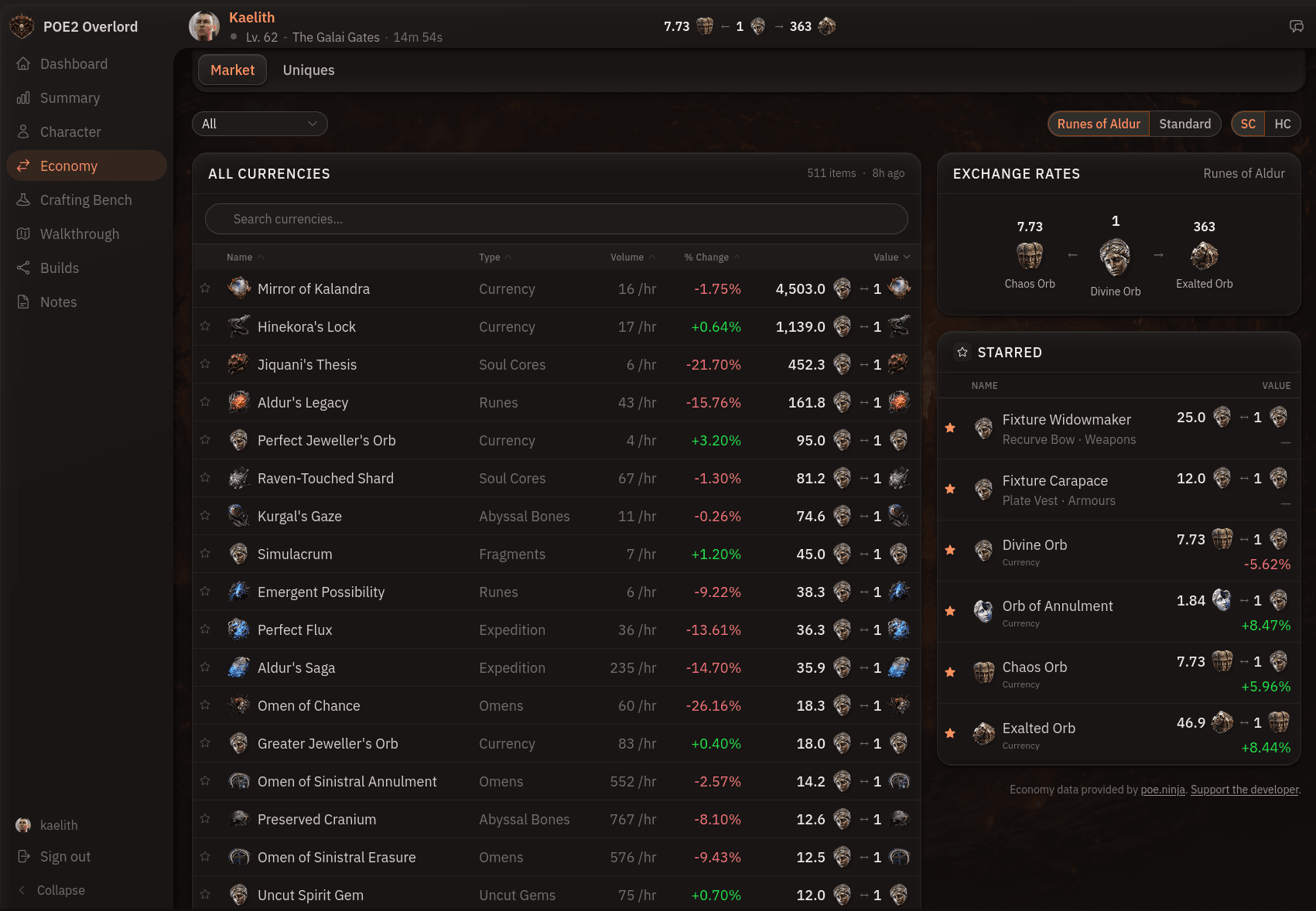
Tracking POE2 Currency Prices
The economy pages track live Path of Exile 2 currency and unique item prices, sourced from poe.ninja and refreshed continuously, so you can check what a drop is worth without alt-tabbing to a trade site.
Currency exchange rates
The currency page lists every tradeable currency in the league, ranked by trade volume, with its current value, hourly volume, and poe.ninja's own recent change percentage. The category tabs along the top narrow the table to a single type, such as runes, soul cores, omens, or fragments.
The exchange rates card on the right shows the Divine to Exalted to Chaos ratio at a glance. That's the number you need most often mid-trade, so it stays pinned while you scroll the table.
Leagues and game modes
The league and mode controls sit in the sidebar. Pick the current league or Standard, then flip between Softcore and Hardcore. Everything on the page updates together, including the exchange rate card and your starred list.
Unique item prices
The uniques page does the same job for unique items. Browse by category, from weapons and armours through jewels, relics, and tablets, or search by name. Each row shows the item's base, level requirement, listing count, and current value, so you can tell a chase unique from vendor fodder.
Starring prices
Click the star on any currency or unique and it joins the Starred card on the economy page. It also feeds the currency ticker on your dashboard, so the prices you watch are visible the moment you open the app. Star what your build farms and what it needs to buy, and the ticker answers whether a map is paying off without leaving the home screen.
Starring needs an account, since the list is saved to it. Everything else on the economy pages is open to anyone.
Browse by Category
League Status


Path of Exile 2 News
- ExileCon 2026 Schedule and Information for AttendeesOct 29, 2026
 Path of Exile 2 1.0 Full Reveal - Watch ExileCon 2026 on November 6 PSTOct 29, 2026
- Two Weeks Until ExileCon 2026!Oct 25, 2026
 Early Access Supporter Packs Leaving SoonOct 22, 2026
 ExileCon 2026 MerchandiseOct 21, 2026
- Path of Exile 2 Full Release Registration - Sign Up and Unlock Exclusive RewardsOct 19, 2026