
Planning a POE2 Build Online
The build planner covers the whole character: class and ascendancy, skill groups, gear, and the passive tree. This post walks through creating one from scratch. If you already have a Path of Building code, importing it is faster and lands you in the same editor.
Start a build
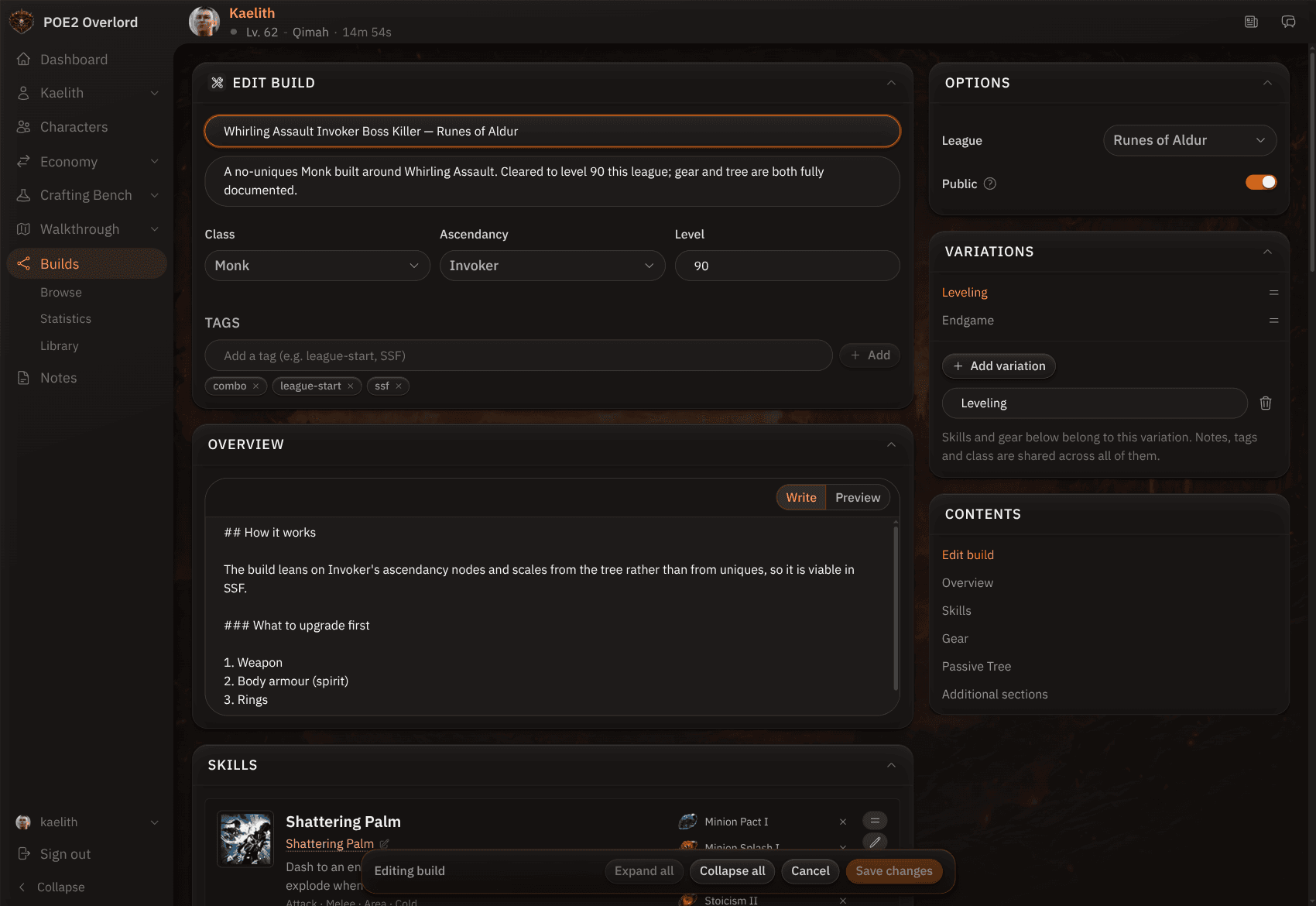
From your library, click New build. Give it a title and a one-line description, pick class, ascendancy, and target level, and add a few tags so people can find it. The Options card on the right sets the league and whether the build is public. Leave it private while you work.
Variations
A build can carry several loadouts, such as Leveling and Endgame. Each variation has its own skills, gear, and tree, while the title, overview, and tags are shared. Add them in the Variations card and switch between them while editing.
Overview
The overview is markdown with a live preview. This is where you explain how the build works and what to upgrade first. Additional sections below the loadout are for anything else, such as defences, leveling notes, or a gear checklist.
Skills and gear
Skills are groups: one active gem and its supports, picked from the game's gem data so tags and requirements are right. Gear is the full equipment doll plus jewels. Each slot takes a rolled base with mods from the catalogue, a unique with its full mod text, or a plain placeholder if all you want to say is "any rare with life and resists." Sockets hold runes and soul cores.
Passive tree
The tree is rendered from the game's data and follows its allocation rules. Weapon-set points are separate pools with their own budgets, coloured apart from the shared allocation. The tree state also lives in a shareable URL, so you can send someone just the tree without publishing anything.
Publish
Flip Public and save. The build appears in browse, on its class and ascendancy pages, and under its tags. Other players can star it, clone it, apply it to a character, or export it. Everything you publish also feeds the statistics page.
Browse by Category
League Status


Path of Exile 2 News
- ExileCon 2026 Schedule and Information for AttendeesOct 29, 2026
 Path of Exile 2 1.0 Full Reveal - Watch ExileCon 2026 on November 6 PSTOct 29, 2026
- Two Weeks Until ExileCon 2026!Oct 25, 2026
 Early Access Supporter Packs Leaving SoonOct 22, 2026
 ExileCon 2026 MerchandiseOct 21, 2026
- Path of Exile 2 Full Release Registration - Sign Up and Unlock Exclusive RewardsOct 19, 2026