
Finding POE2 Builds by Class
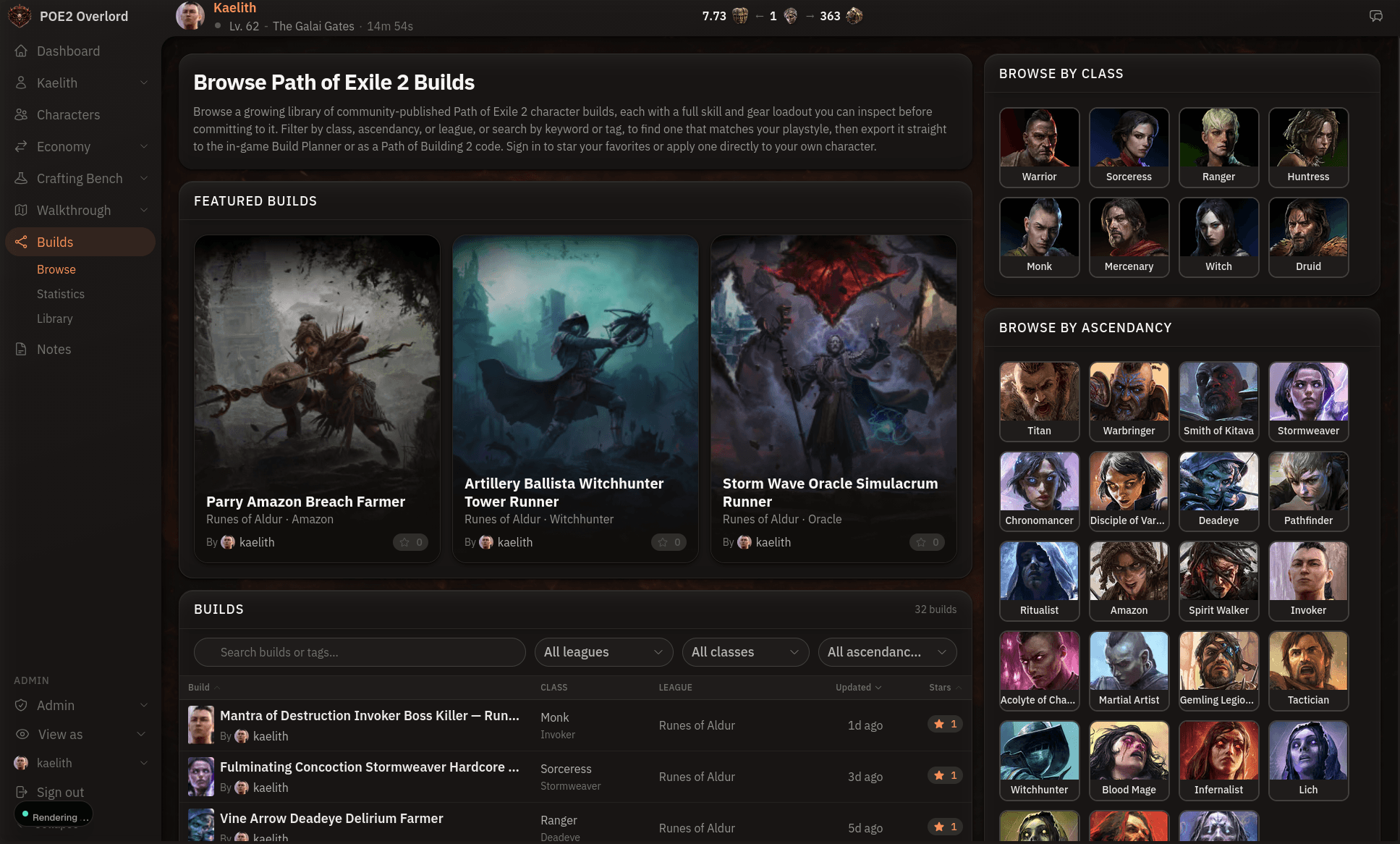
The build library holds the community's published builds. You can read any build's skill groups, gear with full mod text, and passive tree before committing a character to it, with or without an account.
Browsing
The browse page opens with a row of featured builds, then the full list across every league. Filter by league, class, or ascendancy, or search by keyword or tag. Tags are how authors label intent, so league-start, ssf, bosser, and mapper are worth trying before you scroll.
Class and ascendancy pages
Every class and every ascendancy has its own landing page, so if you already know you're rolling an Invoker this league, go straight to the Invoker page and skip everything else. The class portraits on the browse page link to them, and each class page links to its ascendancies. Tags get their own pages too.
What a build page shows
Open a build and you get the author's overview, then the loadout section by section: skills, gear, and passive tree, rendered with the game's art. If the build has variations, such as a Leveling and an Endgame loadout, a switcher in the sidebar flips between them. Star the build to save it to your library.
Statistics
The statistics page pools every published build to show which classes, ascendancies, skills, and supports the community is running, with a per-league breakdown. It's a quick sanity check before you commit to a build whose core skill barely registers.
Applying a build to your character
Once you're signed in you can apply any build to one of your characters. It shows up on that character's Build tab, next to the walkthrough step you're on. Clone a build to make your own edited copy, or export it to the in-game Build Planner or Path of Building. Those two are covered in Import and Export POE2 Builds.
Browse by Category
League Status


Path of Exile 2 News
- ExileCon 2026 Schedule and Information for AttendeesOct 29, 2026
 Path of Exile 2 1.0 Full Reveal - Watch ExileCon 2026 on November 6 PSTOct 29, 2026
- Two Weeks Until ExileCon 2026!Oct 25, 2026
 Early Access Supporter Packs Leaving SoonOct 22, 2026
 ExileCon 2026 MerchandiseOct 21, 2026
- Path of Exile 2 Full Release Registration - Sign Up and Unlock Exclusive RewardsOct 19, 2026