
Guides, Rich Text, and a Month of Fixes
Most of the last three weeks went into one thing: turning notes into guides. Along the way a lot of small, long-standing bugs got fixed, two browse pages were rebuilt, and the same rich-text editor reached builds and walkthroughs. Here's the rundown, with the guides feature at the end.
Bug fixes
- Dropdowns couldn't be used from the keyboard. Arrowing to an option and pressing Enter did nothing; only a click would commit. Every dropdown in the app now takes Enter and Space.
- Clicking outside a dialog didn't close it. It does now, for every modal and confirmation prompt.
- Buttons inside table rows ate your keypress. Pressing Enter on a row's star, edit, or delete button was swallowed by the row itself. Character management and list stars were the visible cases.
- Item icons vanished for good. If a gear slot or table cell ever failed to load one icon, it stayed blank even after you picked a different item.
- Hovering over any text body tinted every link in it at once, instead of just the one under the cursor.
- "Time at level" could run backwards. The leveling page's in-progress combat timer was recomputed from your zone history, which gets trimmed on a long session. It's now a running counter that only ever goes up and resets on level-up.
- The passive tree editor stuttered while saving. Every save forced the whole tree to redraw, even when nothing on it changed.
- Build pages could error out under load. A slow league lookup took down the new-build and edit pages with it. They now degrade gracefully.
- A bad build link showed an error page instead of a normal not-found page.
- The character overview loads faster. It made several round-trips to the database for one page; it makes one now.
- Plus: the economy ticker no longer fetches prices twice on load, a count chart no longer shows half-steps on its axis, line-chart labels stay inside the chart, the code-block copy button fails quietly if the clipboard is blocked, and revoking a just-created helper API key clears it from the reveal panel.
What's new
- Guides. Notes are now guides: a rich-text editor, a public hub, tags, stars, and inline references to builds and items. Details below.
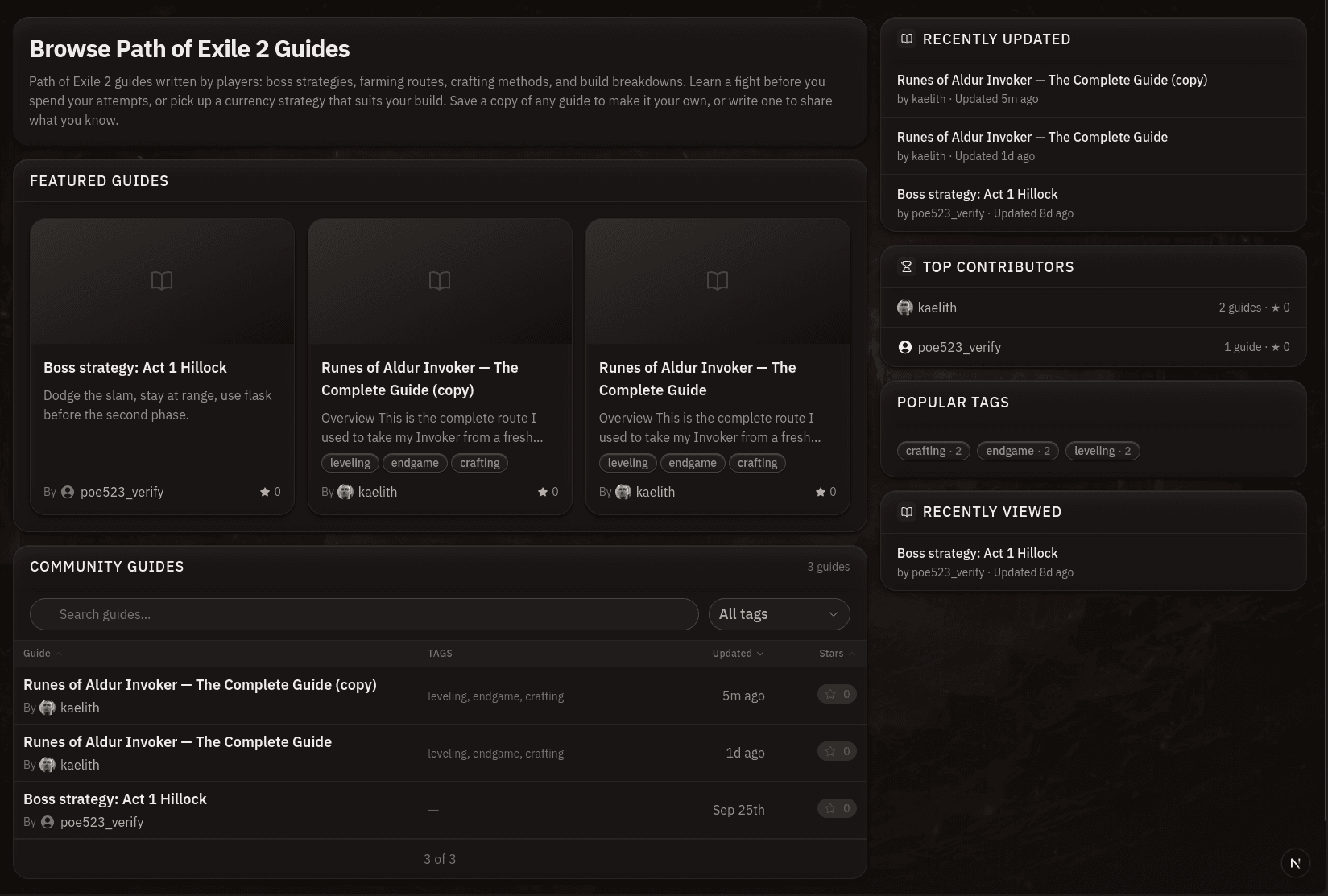
- Crafting recipes and walkthroughs got the builds treatment. Both browse pages now lead with Featured, Trending, Recent, and Recently Viewed cards, a Top Contributors list, and popular tags, each with its own tag pages.
- Rich text everywhere. Build overviews and walkthrough steps use the same editor as guides, so headings, lists, images, and
@references work in all three. - Walkthrough steps advance on a condition, not just a zone. A step now has a location (where it takes place) and a separate rule for what completes it: entering a zone, reaching a level, or marking it done by hand.
- Reporting. Every public guide has a Report button that goes to a moderation queue.
- The blog has fifteen posts, an RSS feed, and live cards. Feature guides for every part of the app, deep-dives on running the helper on Windows and Linux, and an RSS feed. Posts can embed a live build or recipe card instead of a screenshot.
- Send feedback from the chat bubble in the status bar, signed in or not.
Guides
Notes started as a private scratchpad. The rework keeps that, and adds everything needed to publish one.
Writing. The editor is now rich text: headings, lists, quotes, code, dividers, and images, with a / menu for inserting blocks. Type @ to reference a build, walkthrough, crafting recipe, another guide, or a game item (a unique, a base type, a currency, a socketable, or a gem), and it renders inline with its icon and a link. Each guide takes tags and an optional league. Nothing is public until you flip the Public toggle.
Reading. A published guide gets its own page with a Contents sidebar built from your headings, a star button, and a "Save a copy" action so a reader can clone it into their own library and edit from there. Clones keep a credit to the original author.
Finding. The guides hub has Featured, Trending, and Recent guides, Top Contributors, and popular tags, with search and sortable columns underneath. Every tag has a landing page. And because references are real links, a guide that mentions a build, walkthrough, or recipe shows up in a Related Guides section on that page.
Your library. Your own guides live alongside the ones you've starred, filterable by ownership, with drafts marked so you can tell them from what's published.
If you have a crafting plan or a leveling route sitting in a text file somewhere, start a guide and paste it in. As always, let me know what breaks.
Browse by Category
League Status


Path of Exile 2 News
 ExileCon 2026 Race Qualifier VODsOct 1, 2026
 The Last of the Druids Sale - Get One Free Mystery Box When You Spend PointsSep 25, 2026
 Path of Exile 2 is now Steam Deck Verified!Sep 24, 2026
 Path of Exile 2 Full Release Registration - New Reward UnlockedSep 21, 2026
 Introducing The Way of the Stonefist Bundle and Other New EffectsSep 18, 2026
- Fan Art Competition Runners-UpSep 14, 2026